
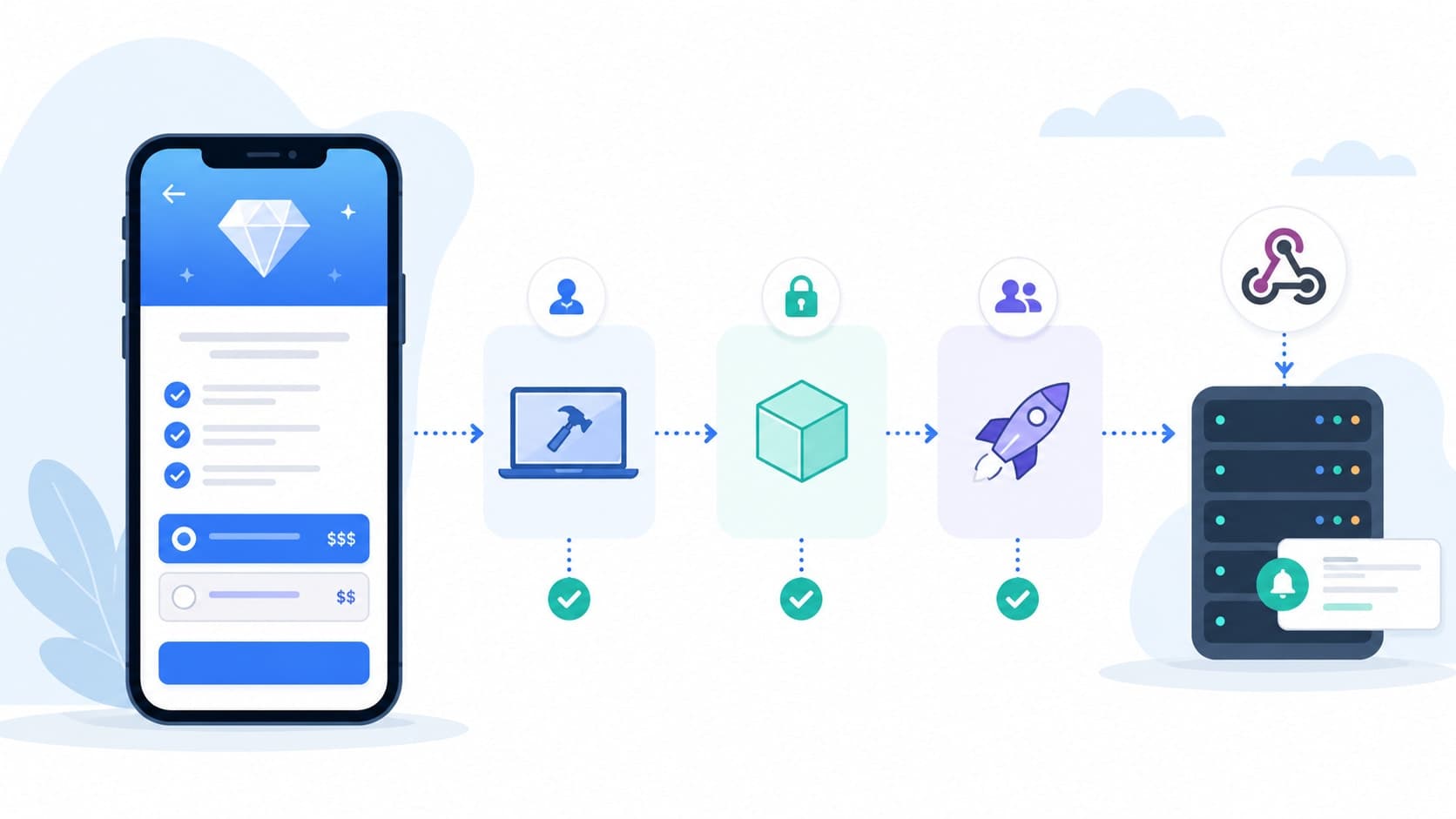
A subscription bug rarely shows up as a crash. It shows up three weeks after launch, as a support ticket from someone who was charged twice, or a churn spike from users whose free trial silently never converted. App Store subscriptions touch client code, server code, and Apple's infrastructure all at once, which means the usual "tap through the app once" testing pass misses almost everything that actually breaks in production. This guide walks through the four pieces you need to get right: local StoreKit testing, the sandbox environment, TestFlight, and the server-to-server webhooks that keep your backend in sync with Apple.
Why Subscription Testing Breaks Most Teams
Most teams test the happy path — buy, confirm, unlock content — and stop there. But subscriptions have a lifecycle: trials, renewals, grace periods, billing retry, upgrades, downgrades, cancellations, and refunds. Each of those transitions can arrive out of order, arrive twice, or not arrive at all if your webhook handler isn't resilient. Apple gives you three separate testing environments precisely because no single one of them can exercise the full lifecycle realistically — treating them as interchangeable is where most subscription bugs come from.
The Three Client-Side Testing Environments
Before touching webhooks, get the client-side purchase flow solid. There are three distinct environments, each suited to a different stage of development.
1. Local StoreKit Testing in Xcode
Xcode's StoreKitTest framework lets you define products and subscription groups in a local .storekit configuration file, with no network connection and no App Store Connect setup required. This is the fastest loop available: you can trigger purchases, simulate renewals, and test how your UI reacts to different subscription states entirely on-device or in the simulator. It's ideal for the earliest stage of development, before your products even exist in App Store Connect, and for exercising edge cases like a failed transaction or a expired subscription without waiting for anything to actually expire.
Open the .storekit file in Xcode and use Editor → Subscription Renewal Rate to compress a monthly subscription's lifecycle into minutes instead of days — this is what makes it practical to test grace periods and multiple renewal cycles in a single afternoon.
2. The Sandbox Environment
Once your products exist in App Store Connect, the sandbox is where you validate that your actual configuration — pricing tiers, subscription groups, introductory offers — works correctly, not just your app's logic. Sandbox testing uses a dedicated Sandbox Apple Account rather than your real Apple ID, and it talks to Apple's real servers rather than a local file. This is the first point where an end-to-end test — client purchase, receipt validation, and your backend picking up the resulting event — actually means something.
- Create a sandbox tester in App Store Connect under Users and Access, using an email address that isn't tied to a real Apple ID.
- Sign out of your production Apple ID in the App Store app on the test device before you begin — signing into the sandbox account happens automatically the first time you attempt a purchase.
- Trigger the purchase inside your app, not through the App Store; sandbox purchases only register when initiated from a build running your StoreKit integration.
- Verify the receipt and entitlement on your backend to confirm your server-side validation logic recognises a sandbox transaction correctly.
3. TestFlight — The Closest Thing to Production
TestFlight builds use the sandbox purchase backend, but with the tester's real Apple ID rather than a dedicated sandbox account — which makes it the closest approximation of production behaviour you can get before actually shipping. It's also the stage where teams most often get caught off guard: TestFlight purchases can't be cleared or reset the way sandbox purchases can, and a handful of edge cases (Ask to Buy, family sharing, certain regional pricing quirks) only surface reliably here. Run your final pre-release pass in TestFlight, not sandbox alone.
Three environments, not one — a local StoreKit file for fast logic testing, the sandbox for validating real product configuration, and TestFlight for the closest possible rehearsal of production.
Common practice among iOS subscription engineering teams
Testing Webhooks: App Store Server Notifications
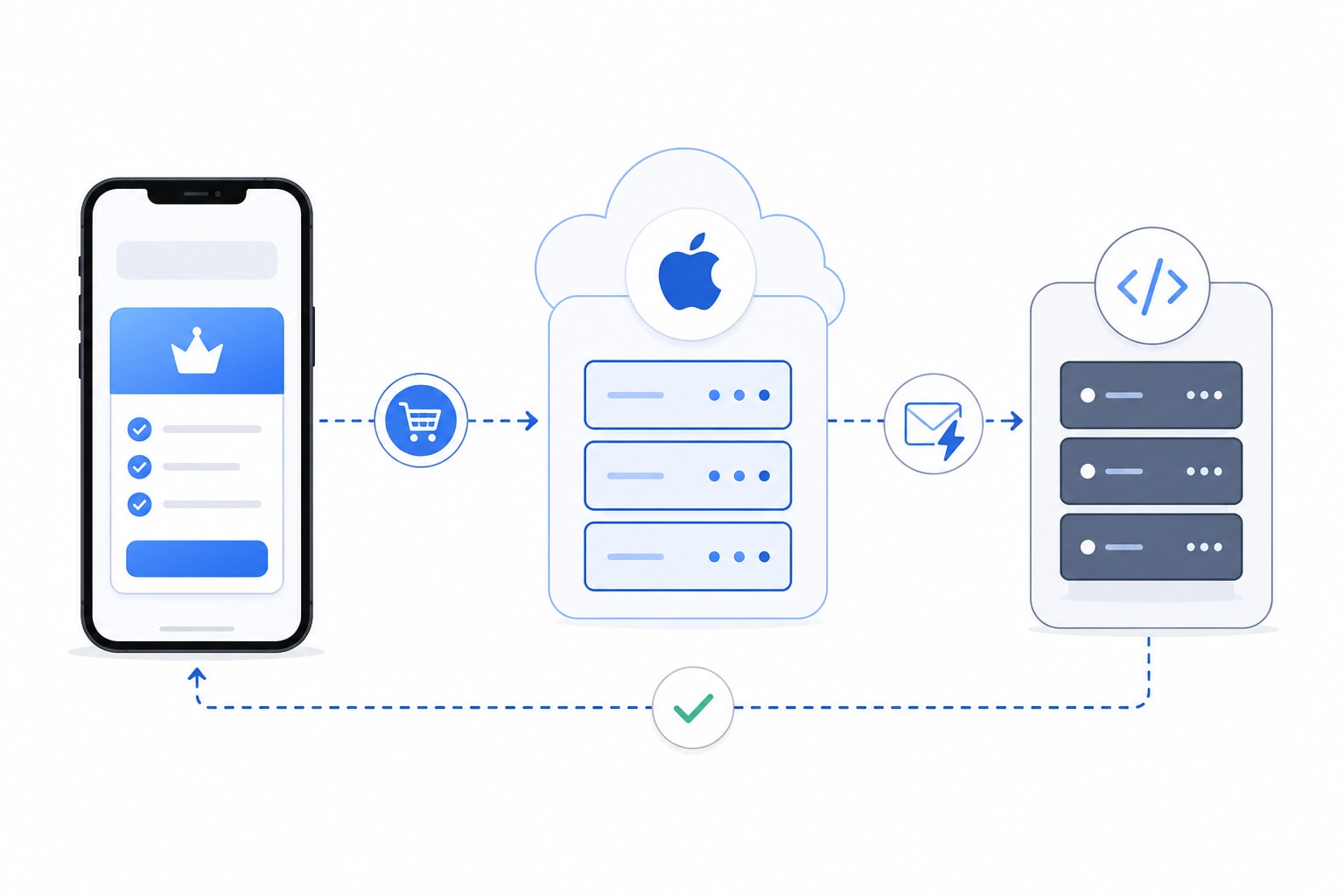
The client-side purchase sheet is only half the system. The other half is App Store Server Notifications — the webhook events Apple sends your backend whenever a subscription's state changes: renewal, cancellation, billing retry, refund, price consent, and more. If your server-side handling of these events is untested, your backend's view of who's subscribed will quietly drift from reality, and drift like that is expensive to unwind once it's live.
Set Separate Sandbox and Production URLs
In App Store Connect, under your app's App Store Server Notifications settings, you can configure a Production Server URL and a separate Sandbox Server URL. Always set both, and point them at genuinely different endpoints (or at minimum, different logging paths) so sandbox noise never contaminates production data or triggers production side effects like real billing emails.
Expose Your Local Server With a Tunnel
Apple's servers need a publicly reachable HTTPS endpoint — they can't reach localhost. During development, a tunneling tool that exposes your local server over a public HTTPS URL is the standard workaround, letting sandbox notifications hit your machine directly while you debug handler logic line by line.
Use the Request a Test Notification Endpoint
Before relying on a real sandbox purchase to trigger a webhook, use Apple's Request a Test Notification API to confirm your endpoint is reachable and correctly configured at all. It sends a single synthetic TEST notification to whichever URL is currently set, independent of any actual transaction, which isolates "is my endpoint wired up correctly" from "is my transaction logic correct" as two separate questions instead of debugging both at once.
- Always return a 200 response, even for notification types you don't act on yet — Apple treats a non-200 response as a delivery failure and will retry, which can flood your logs and your alerting.
- Don't assume sandbox mirrors every production event — some transaction states (declines, certain pending or Ask to Buy flows) have historically been inconsistent in sandbox notification delivery, so treat a missing sandbox event as inconclusive, not proof your handler is broken.
- Verify the JWS signature on every payload in your handler; skipping signature verification because "it's just sandbox" is exactly how that habit ends up shipped to production.
- Log the raw payload before any processing, so a malformed edge case is debuggable after the fact instead of silently swallowed.
A Pre-Launch Subscription Testing Checklist
- Exercise trial start, trial-to-paid conversion, and trial cancellation using an accelerated renewal rate in local StoreKit testing.
- Validate every subscription tier, introductory offer, and promotional offer against your real App Store Connect configuration in sandbox.
- Confirm your backend correctly links a receipt to the right user account, including the case where a purchase happens on a second device.
- Test upgrade and downgrade paths between tiers in the same subscription group, not just new purchases.
- Trigger and verify a billing-retry and grace-period scenario, and confirm your app degrades access gracefully rather than abruptly.
- Run a full purchase-to-entitlement flow in TestFlight on at least one physical device before submitting for review.
- Send a Request a Test Notification call to confirm both your sandbox and production webhook URLs are live and returning 200.
- Confirm your webhook handler is idempotent — replaying the same notification twice should never double-grant or double-revoke access.
How We Approach This at Fall Rise Infotech
On subscription-based apps we've built at Fall Rise Infotech, we treat webhook idempotency and sandbox-to-TestFlight parity as release-blocking checks, not optional polish — a lesson learned from client apps where entitlement drift showed up only after launch. It's the same discipline behind other products we maintain, like the Bhaada logistics platform, where getting state transitions right the first time matters more than shipping a day earlier. You can see more of this kind of work across our project portfolio.
Subscription testing isn't a single checkbox before submission — it's a layered process across local StoreKit testing, sandbox, TestFlight, and your webhook infrastructure, each catching a different class of bug. Skipping any one layer just moves the bug from your test suite to your support inbox. If you're building or hardening a subscription product and want a second set of eyes on your testing setup, let's talk.