
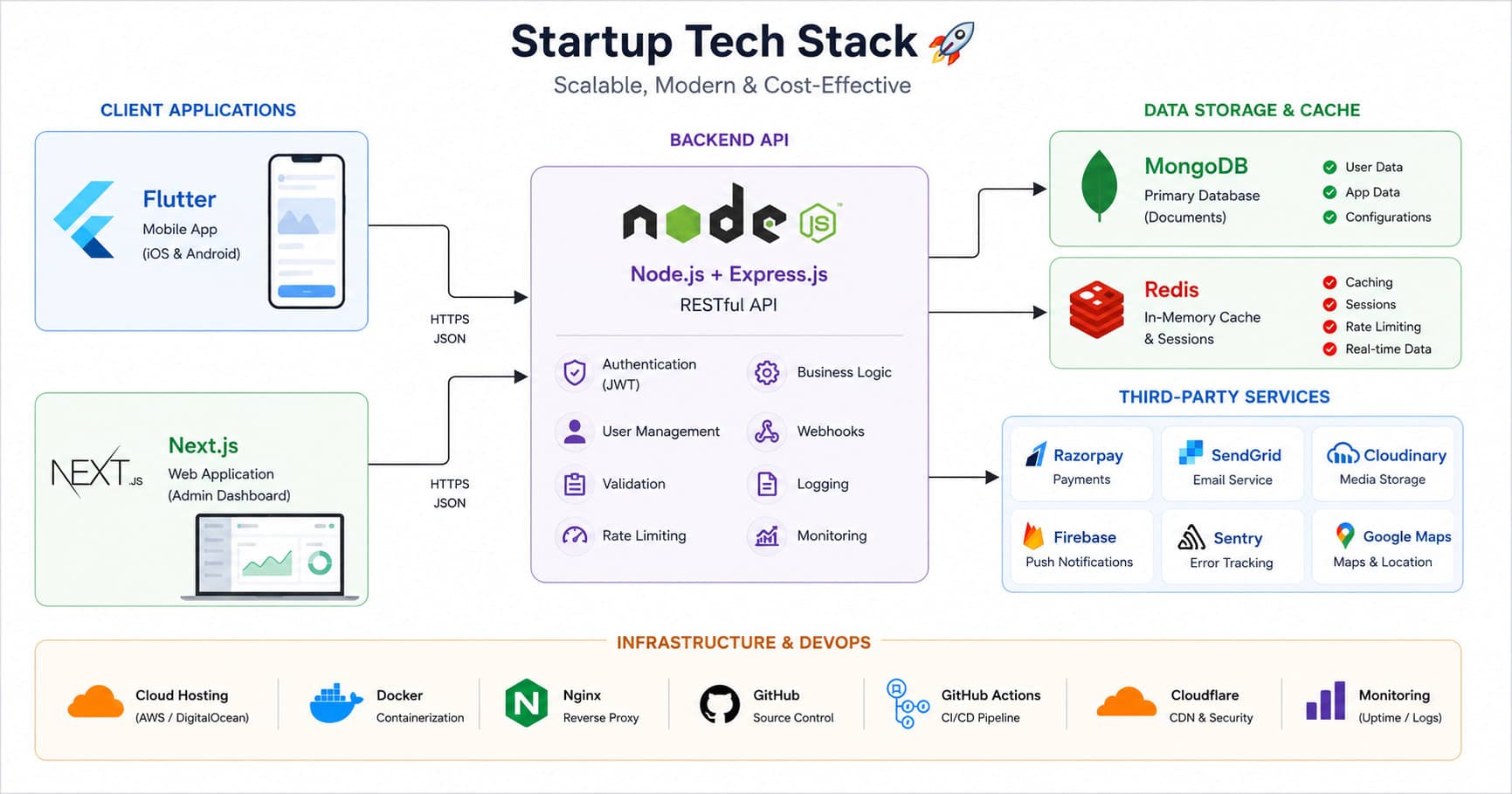
Every founder eventually hits the same wall: what do we actually build this on? There's no shortage of opinions — every framework has a subreddit insisting it's the only sane choice. But for an early-stage app startup, the right stack isn't the trendiest one. It's the one that lets a small team ship a working product fast, scale it without a rewrite, and keep monthly costs close to zero for as long as possible. This is the stack we default to at Fall Rise for most client apps, and the reasoning behind each piece.
Start With the Constraints, Not the Framework
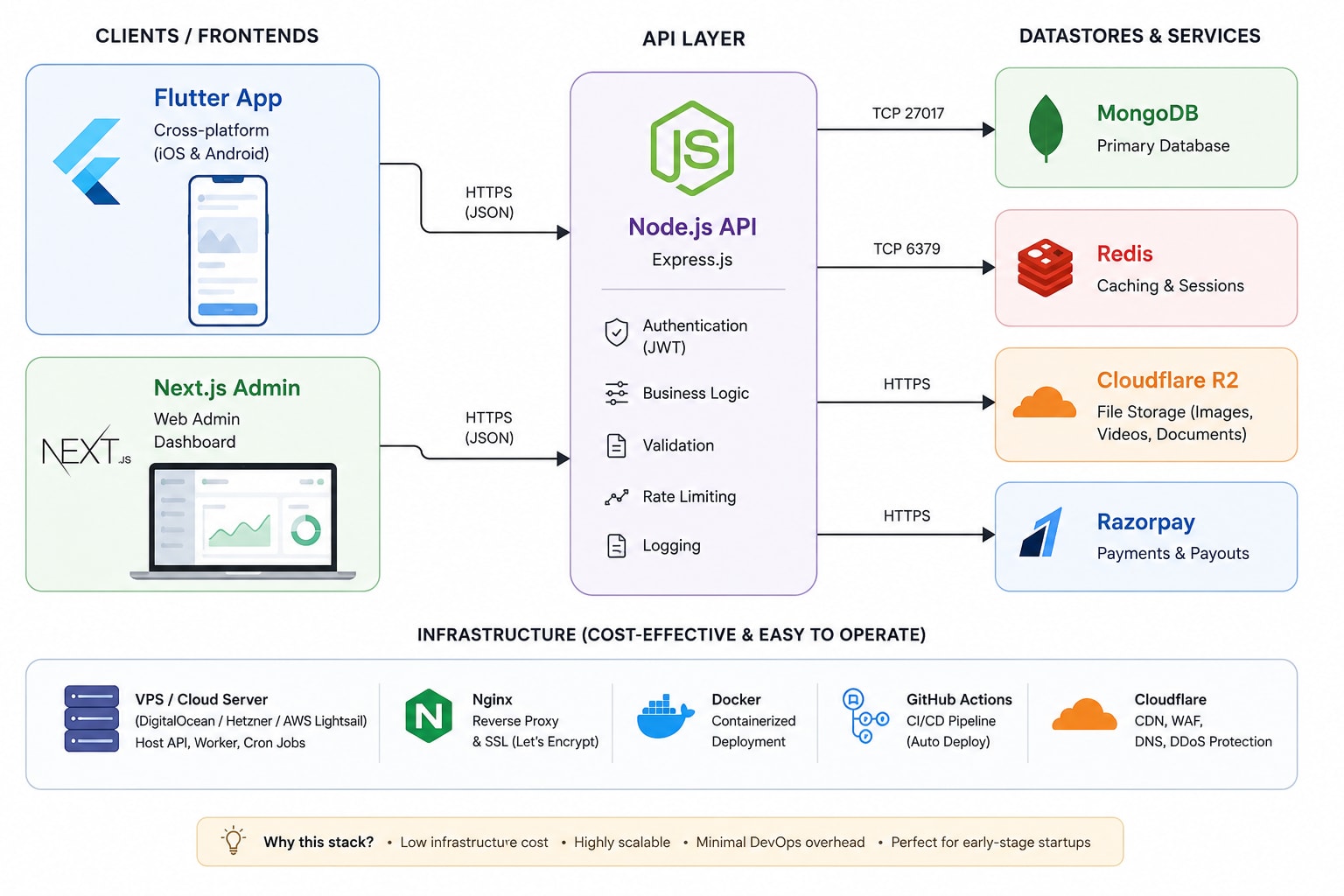
Before picking a single tool, get honest about three things: team size, runway, and how many platforms you need on day one. Most app startups need three surfaces — a mobile app for end users, an admin panel for the internal team, and a backend that ties everything together. Optimising the stack for all three at once, with the smallest possible team, is the actual problem you're solving. Everything below follows from that.
The Frontend Layer: Flutter for the App
Flutter earns its place for one simple reason: one codebase, two app stores. A two-or-three-person team cannot realistically maintain separate Swift and Kotlin codebases in parallel and still ship features weekly. Flutter compiles to native ARM code rather than running through a JavaScript bridge, so performance stays close to native even on animation-heavy screens. It also gives you a single design system to maintain — no drifting UI between iOS and Android versions six months in.
- Single codebase — one team ships to iOS and Android simultaneously, halving QA and release overhead.
- Native performance — compiled to native ARM, not interpreted, so scrolling and animation stay smooth.
- Mature ecosystem — packages for payments, push notifications, and maps are production-ready, not experimental.
- Hot reload — iteration speed during early product development is genuinely faster than most native workflows.
The Admin Layer: Next.js
The admin panel is where founders are tempted to cut corners, and where cutting corners hurts the most six months later. Next.js is the right default here because it isn't really "just a frontend framework" — its API routes and server components let a single Next.js project handle both the admin UI and a chunk of internal tooling without spinning up a separate service. For an early team, that means one deploy pipeline instead of two, and one set of developers who can move between admin features and marketing pages without context-switching frameworks.
Why Not Reuse Flutter for Admin Too?
It's tempting to build the admin panel in Flutter Web and reuse components. In practice, admin panels are data-table-and-form-heavy, and the web ecosystem around React (data grids, charting libraries, auth patterns) is simply more mature for that specific job than Flutter Web currently is. Using the right tool for each surface, rather than forcing one framework everywhere, saves more time than it costs in the first year.
The Backend Layer: Node.js
Node.js ties the app and admin panel together through a single API layer. The biggest practical win is hiring and context-sharing: if your admin is Next.js, your backend engineers and frontend engineers are writing JavaScript/TypeScript either way, so people can move across the stack when priorities shift — a real advantage for a five-person team where nobody has the luxury of being a pure specialist. Node's non-blocking I/O model also happens to suit the exact workload most app startups have early on: lots of concurrent, lightweight requests (feed loads, auth checks, notification triggers) rather than heavy CPU-bound computation.
The best backend language for a startup is the one your team already knows well enough to debug at 11pm.
Common wisdom among early-stage CTOs
The Data Layer: MongoDB and Redis
MongoDB for the Primary Store
Early-stage products change shape constantly — a feature you shipped last sprint might need three new fields next sprint. MongoDB's schema flexibility removes the migration overhead that a rigid relational schema would impose during this phase, without giving up indexing, aggregation pipelines, or the ability to enforce structure later via schema validation once the data model stabilises. It also pairs naturally with a Node.js backend, since both speak JSON-like documents end to end.
Redis for Everything That Needs to Be Fast
Redis sits in front of MongoDB for anything read-heavy: session tokens, rate limiting, leaderboard-style rankings, and cached responses for endpoints that don't need to hit the database on every call. The rule of thumb we use: if a query result doesn't change more than once a minute but gets read hundreds of times a minute, it belongs in Redis, not MongoDB. This single pattern typically removes the majority of database load an app generates in its first year.
Infrastructure and Third-Party Services
The services layer is where a lot of startup budget quietly leaks. Choosing correctly here can buy an extra six to twelve months of runway before infrastructure becomes a real line item.
- Google Cloud Platform ($300 free credit) — run the initial Node.js backend and MongoDB/Redis instances on GCP's trial credit. It's enough to comfortably host a pre-launch and early-traction app for several months while validating product-market fit before committing to paid infrastructure.
- Cloudflare R2 for object storage — user-uploaded images, videos, and static assets go to R2 instead of a traditional cloud storage bucket, primarily because R2 has zero egress fees. For a media-heavy app, egress charges from other providers can quietly become the largest line item on the infra bill; R2 removes that risk entirely.
- MongoDB Atlas — rather than self-hosting Mongo on a GCP VM, use Atlas's free or entry-tier cluster. It handles backups, monitoring, and failover so nobody on a three-person team has to become an accidental database administrator.
- Redis (managed or self-hosted on the same GCP credit) — a small managed Redis instance is cheap enough to run from day one; don't wait until performance problems appear to add a cache layer.
Payments: Razorpay
For any app monetising in India — subscriptions, one-time purchases, or marketplace-style payouts — Razorpay is the practical default. It supports UPI, cards, netbanking, and wallets out of the box, has a well-documented Node.js SDK, and its webhook model integrates cleanly with a Node.js backend for reconciling payment status without polling. For startups planning to add payouts to vendors or drivers later (marketplace or logistics-style apps), Razorpay's payout APIs mean you don't need to bring in a second payments provider down the line.
How These Choices Age
The honest test of a startup stack isn't whether it's impressive on day one — it's whether it still makes sense at 50,000 users. Flutter scales fine for the vast majority of consumer apps; the rewrite conversation only starts at a scale most startups never reach. Node.js and MongoDB scale horizontally without architectural changes, and Redis simply gets a bigger instance. The one component worth watching is GCP's free credit — plan to move to a proper billing account and right-sized instances before the $300 runs out, not after.
There's no universally "correct" stack — there's only the stack that matches your team, your runway, and your users. Flutter, Next.js, Node.js, MongoDB, Redis, Cloudflare R2, GCP credits, and Razorpay happen to be a combination we've shipped repeatedly because each piece earns its place without adding operational weight a small team can't carry. If you're scoping a build and want a second opinion on your stack before writing the first line of code, let's talk.