

Every application eventually asks the same question: who is allowed to do this? A support agent shouldn't be able to issue refunds. A driver on a logistics app shouldn't see another driver's payout history. A junior admin shouldn't be able to delete a production database. Role-Based Access Control (RBAC) is the system that answers that question consistently, instead of leaving it to scattered if (user.isAdmin) checks buried across your codebase. Done well, RBAC is invisible to the people using your product and airtight for the people trying to misuse it. Done poorly, it's either a security hole or a maze nobody can maintain.
What RBAC Actually Is
RBAC assigns permissions to roles, and roles to users — not permissions directly to individual people. An Admin role might carry permissions like users.invite, billing.manage, and settings.edit. A Viewer role might carry only records.read. When someone joins your platform, you don't hand-pick forty individual permissions for them; you assign a role, and they inherit everything that role carries. This one layer of indirection is what makes access manageable at any scale — three users or three thousand.
Why You Need RBAC, Not Just an 'is Admin' Flag
Most products start with a single boolean: a user is either an admin or they're not. That works for exactly as long as the product has one type of user. The moment you add a support team, a billing team, client-side collaborators, or multiple organisations sharing one instance, a binary flag stops being able to express reality. You end up patching in exceptions — if (user.isAdmin || user.email === 'ops@company.com') — and every one of those exceptions is a future security incident waiting to happen. RBAC exists to solve four concrete problems before they become that incident:
- Least privilege — every user should hold only the access their job actually requires, nothing more.
- Predictable onboarding and offboarding — assigning or revoking a role should immediately grant or remove the right set of permissions, with no manual checklist to forget.
- Auditability — when something goes wrong, you need to answer 'who could have done this' in seconds, not by reading through scattered permission checks in code.
- Multi-tenant safety — in a SaaS product, a role in one customer's account must never leak access into another customer's data, even if the role names match.
What a Good RBAC System Should Solve
Before writing a single line of authorization logic, it helps to be explicit about what the system is actually for. A well-designed RBAC layer should be able to answer all of the following, on demand, for any user:
- What can this user do right now? — a live, queryable list of effective permissions, not just a role name.
- Why can they do it? — which role, or which combination of roles, granted that specific permission.
- What happens the instant their role changes? — access should update immediately across active sessions, not on next login.
- Can this decision be reversed and audited? — every grant, revoke, and role change should leave a trail.
A role structure nobody enforces is a compliance artifact. A role structure wired into provisioning, requests, and reviews is an access control system.
Common wisdom among enterprise IAM teams
Parameters That Make RBAC Easy to Use
The technical model behind RBAC is simple; keeping it usable as the product grows is where most teams struggle. A handful of design parameters decide whether your RBAC stays maintainable or turns into permission spaghetti within a year.
1. Roles vs. Permissions vs. Scopes
Keep these three concepts separate in your data model. A permission is an atomic action (invoice.create). A role is a named bundle of permissions (Billing Manager = invoice.create + invoice.refund + invoice.read). A scope defines where that role applies — a specific project, team, or tenant, rather than the whole account. Mixing these into one flat structure is the most common reason RBAC systems become unmanageable.
2. Role Hierarchy and Inheritance
Support hierarchical roles so an Owner automatically inherits everything an Admin can do, without duplicating permission lists across roles. This keeps your permission matrix small and prevents the drift that happens when someone updates the Admin role and forgets to update Owner to match.
3. Resource-Level and Field-Level Granularity
Some actions need to be gated not just by role, but by which specific record is involved — a manager can approve expenses for their own team but not another team's. Decide early whether your system needs this row-level granularity, because retrofitting it into a purely role-based model later usually means a partial migration toward Attribute-Based Access Control (ABAC) layered on top.
4. Separation of Duties
For anything touching money, compliance, or production infrastructure, make sure no single role can both perform and approve the same action — the person who submits a payout shouldn't also be able to approve it. This is a common audit requirement, and it's far cheaper to design for upfront than to bolt on after a compliance review flags it.
5. Sane Defaults and Self-Service
New users should land in a low-privilege default role, with a clear, logged path for an admin to elevate them — not the reverse. Where possible, let account owners manage roles themselves through an admin panel rather than filing a ticket to your engineering team every time someone changes departments. A role-management screen like this is a standard part of the admin portals we build.
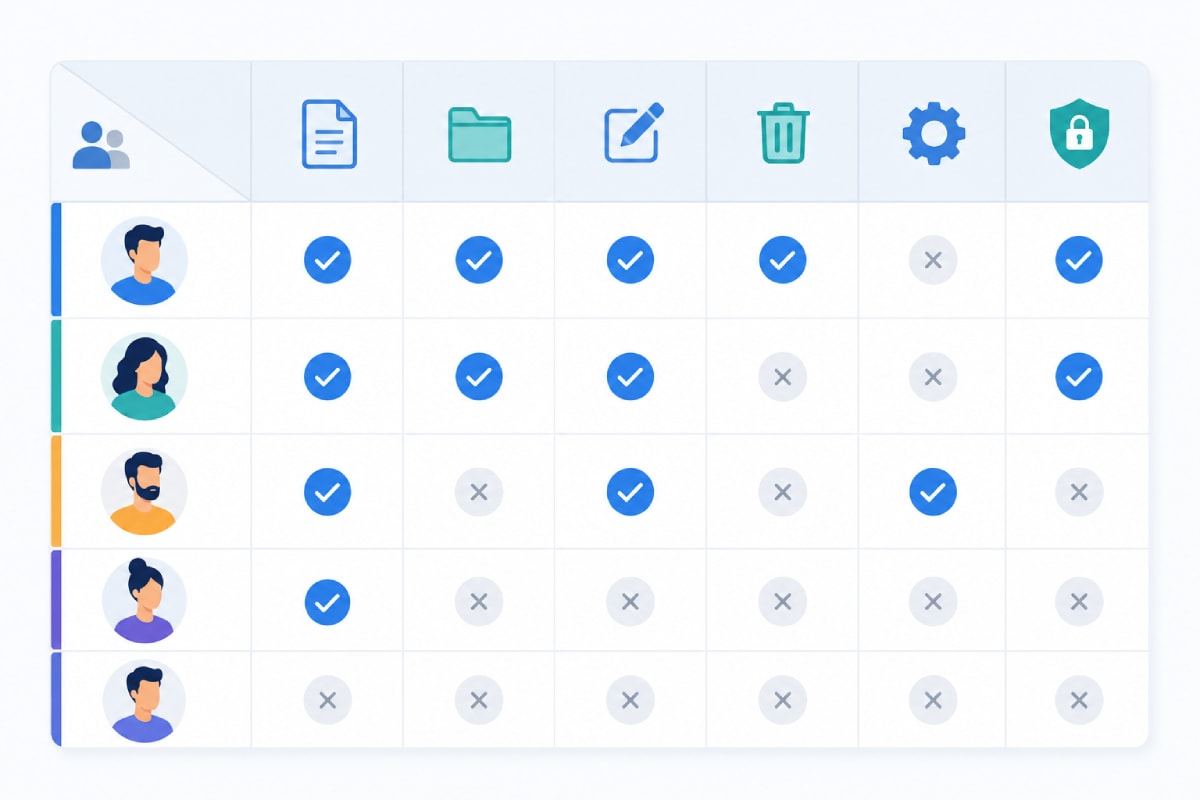
The Permission Matrix: Your Source of Truth
A permission matrix maps every role against every permission in a single grid — one axis lists roles (Owner, Admin, Manager, Member, Viewer), the other lists permissions (users.invite, billing.manage, reports.export, and so on), and each cell is a yes or no. This isn't just documentation; it should be the literal data structure your authorization middleware reads from. When the matrix lives in code or a database table instead of a scattered set of conditionals, adding a new role or auditing an existing one becomes a five-minute task instead of a code archaeology exercise. For most B2B products, four to seven roles is enough — Owner, Admin, Manager, Member, and Viewer cover the majority of real-world needs; add specialised roles like Billing or Auditor only when an actual customer need shows up.
Dynamic User Creation and Role Assignment
Static roles hard-coded at launch rarely survive contact with real customers. A production-ready RBAC system needs to support dynamic user creation — new users provisioned through invites, SSO, or API calls — and assign roles automatically based on context, not just a manual admin click for every signup. A well-built backend API layer should expose this as a first-class capability: creating a user, assigning an initial role, and updating that role later should all be simple, auditable API calls rather than direct database writes.
- Invite-based provisioning — an admin invites a user with a pre-selected role; the role is enforced from the first login, not applied retroactively.
- SSO and directory sync — for enterprise customers, roles can map to groups in their identity provider, so access updates automatically when someone changes teams internally.
- Self-serve signup with default roles — for consumer or prosumer products, new sign-ups land in a safe default role until an existing admin elevates them.
- Bulk role changes — reorganisations happen; the system should support reassigning many users at once without a script run directly against production.
RBAC Implementation Checklist
Before calling an RBAC system production-ready, it should cover every item below. This is the checklist we run through on every client project that touches user permissions, whether it's a multi-tenant SaaS product or an internal tool built through custom software development.
- A defined permission matrix stored as data, not scattered conditionals in application code
- Role hierarchy with inheritance, so higher roles don't need every permission re-declared
- Tenant or organisation scoping, so roles never leak access across customer accounts
- Dynamic user creation with role assignment built into the sign-up and invite flow
- An admin UI for managing roles and permissions without engineering involvement
- Session or token invalidation the moment a role changes, not on next login
- Audit logs for every grant, revoke, and role change, with who made the change and when
- Separation of duties enforced for financial or destructive actions
- Automated tests covering both what each role can and explicitly cannot do
- A documented process for reviewing and pruning unused or over-privileged roles periodically
How We Approach RBAC at Fall Rise
On RentEra, our rental platform, RBAC isn't a nice-to-have — it's the boundary that keeps managers, staff, and admins from ever seeing data outside their own scope, in a product where trust is the entire value proposition. Every role in RentEra maps to a specific set of API-level permissions enforced server-side, never trusted purely on the client. You can see this and other builds in our RentEra case study. Whether it's a mobile app for field teams built through our mobile application development work, or the servers and infrastructure behind it handled through hosting and deployment, permissions get designed as part of the architecture from day one — not patched in after the first security review.
RBAC is easy to get right at the start and expensive to retrofit later — every hard-coded admin check you ship today is a migration you'll eventually have to reverse. If you're scoping a product that needs proper role and permission management, from a lean single-role MVP to a multi-tenant enterprise system, let's talk about your access control model before you write the first permission check.